Which languages are supported? | |
| Visual Basic (VB) and C#. Other .NET languages are supported too, but there are no specific templates available. | |
Which databases are supported? | |
| The RADvolution Designer is independent of .NET database provider. | |
Do I need Visual Studio to use the RADvolution Designer? | |
| Yes, you need Microsoft Visual Studio (any Edition is supported, except Express Editions) | |
Can I use RADvolution for Web projects? | |
| No, at the moment RADvolution is only available for WinForm projects. A version for Web projects will be available in the future. | |
Why do I get an error after using the RADvolution wizard? | |
| When you get the error "The designer could not be shown for this file because none of the classes within it can be designed." you probably forgot to add a reference to the RADvolution.dll into your project. When starting a new project, adding a reference to the RADvolution.dll is the first thing to do. | |
Does the Layout Engine work with third party .NET controls? | |
| Yes. Any 3rd party control which directly or indirectly is derived from a System.Windows.Form.Control is supported. This is the case in more than 95% of the situations. This is also good programming practice of the 3rd party vendor.
To mention just a few vendors with already successfully used controls within the RADvolution framework:
ComponentOne Infragistics Janus Systems SyncFusion PureComponents DivElements | |
Does the Layout Engine work with third party COM controls? | |
| Third-party COM controls are correctly positioned too, but custom layout settings (such as Custom Anchor) are not provided. | |
Is the layout engine only active at designtime? | |
| Yes. At designtime the layout engine accomplishes its tasks (e.g. sets the locations of the controls). At runtime the layout engine is not active at all. | |
Can the layout engine be used at runtime? | |
| We can provide a custom solution for your situation. Contact sales@DevelopGuidance.com for info. | |
Do I have to ship the RADvolution.DLL to my clients? | |
| Yes. It extends the .NET framework. The layout engine itself is not active at runtime, but related issues are, such as the use of prompts for making professional feedback messages. | |
Why does the auto layout process not automatically set the Control.Size after I change its Font? | |
| Changing the Font immediately resizes the Control (when necessary). This is default behavior in Visual Studio. When a Size changes, the "Custom Size" is set to true. This is default behavior in the RADvolution Designer. Solution: simply set "Custom Size" to false after changing the Font of a Control. | |
Why is there no space between the form left and right handling panel when the form handling location is set to right? | |
| You can set its Top Margin using the "Custom Margins" link shown at the bottom of the properties window. Be aware that rightmouse clicking on a form handling panel does not show this item, so you must use the properties window here. | |
Why is my parent control (such as a Form, GroupBox or Panel) not sized correctly since a Control within crosses its boundaries? | |
| In most cases the "Skip auto layout process" setting of the Control within was set to true. Set this to true by rightmouse clicking on the Control and select "Skip auto layout process" when there is a checkmark in front. By default the auto layout process automatically sets the size of a parent control according to the controls within which do not skip the auto layout process. | |
I only want to invoke the layout engine when I want it. Is this possible? | |
| Yes. Go to the form layout settings (select this item by rightmouse clicking on your form). On the 1st tabpage deselect the checkboxes in the "When" GroupBox. Now the layout engine is only invoked when you select the "Auto layout" item by rightmouse clicking on your form). | |
Why has changing the margin properties no effect? | |
| Changing the margin properties in the property window has only effect when the 'Custom Margins' property is true. This property can only be checked by rightmouse clicking on the selected parent control and checking the 'Custom Margins' menu item. | |
How do I place the 1st control into the 2nd column? | |
There are 2 solutions:
1. Place a Label in front of the 1st control and clear its Text property after using Quick Design. Advantage is that the Label adjusts its width to its column width.
2. Use a Spacer as the 1st control; | |
How do I set a default font using a RADvolution form? | |
| Create a new default form which inherits from DevelopGuidance.RADvolution.Windows.Forms.Form.
Set your default font settings in your default form using the property window.
When creating new forms, simply inherit from your default form. Your new forms will inherit the font settings automatically and since it is a RADvolution form also contains all layout power. After changing a font select the "Auto layout" item by rightmouse clicking on your form, so control sizes are automatically adjusted. | |
Why is Size.Height of my form incorrect? | |
When using a Menu on a form and a MinimumSize, the Size is automatically adjusted to a too large Height value. Microsoft confirmed this to be a bug in .NET framework 1.1. Is has nothing to do with the RADvolution layout engine.
There is a workaround. Using C# you can use the following code at the load event of your RADvolution form:
this.FormLayoutManager.ApplyTemporaryAnchorToControlAnchors();
this.Size = new Size(this.Size.Width, this.Size.Height - 20);
this.FormLayoutManager.RestoreControlAnchors();
Using this code the Size is corrected at runtime.
To see the correct Height at designtime (every time after reopening the form at designtime): select the form and rightmouse click and select 'Auto layout'. Be aware that the code above is still needed after pressing 'Auto layout' at designtime! | |
How do I right align controls without VDI? | |
1. Add a Spacer control in front of the controls to be right aligned.
2. Adjust the Spacer width by resizing the Spacer.
To keep the controls right aligned when resizing the form, check the 'Left' and 'Right' settings of the anchor of the Spacer (rightmouse click on the Spacer control and select 'Custom Anchor ...', check 'Left' and check 'Right'). These anchor settings are already present when the Spacer is located in the horizontal resize column. | |
How do I bottom align controls without VDI? | |
1. Add a Spacer control above the controls to be bottom aligned.
2. Adjust the Spacer height by resizing the Spacer.
To keep the controls bottom aligned when resizing the form, check the 'Top' and 'Bottom' settings of the anchor of the Spacer (rightmouse click on the Spacer control and select 'Custom Anchor ...', check 'Top' and check 'Bottom'). | |
How do I set a tab order per column? | |
1. Add a Panel control for each group of controls which belong to the same column. By default the tab order will be the Z-order in each Panel.
Example:
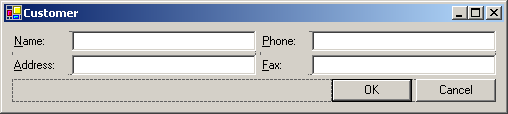
Without using Panels the tab order will be:
from NameTextBox to PhoneTextBox, and from AddressTextBox to FaxTextBox.
Using two Panel controls the tab order will be:
from NameTextBox to AddressTextBox, and from PhoneTextBox to FaxTextBox.
(to accomplish this you have to move the Name and Address controls into the first Panel and the Phone and Fax controls into the second Panel)
2. Set the tab order of the form to "Vertical".
Go to the form layout settings of the form (rightmouse click on your form and select "Form layout settings ...") and on the "AutoLayout" tabpage set the tab order to "Vertical". Press OK.
This will have the same result using the example above, only the Panels are not needed. However dependent on your situation you not might want to apply a vertical tab order for the complete content. Be aware that you can override this default tab order setting per parent control. To do this simply select the parent control (such as a Panel), rightmouse click and select "Custom TabOrder ...". | |
How do I add an empty Label? | |
| Place a Label on your form. The Quick Design window pops up. Enter your text in the 'Text' entry, so the name of the Label will be composed. Select "{None}" as the following control. Press OK. Go to the properties window and clear the "Text" property of the just added Label. | |
How do I deal with the size of an empty Label? | |
| In some situations the text property of a Label is empty. Resize the Label to a custom size. The "Custom Size" property is then automatically set to true. When you do not set a custom size for an empty Label its width is made very small by the auto layout process. | |
How do I add a control without a following control? | |
| In the Quick Design window select "{None}" as the following control. | |
Why does the cancel button not work? | |
| The form should be started as a Modal dialog. When you start the form from a menu with a MenuManager, go to the menu item properties and set the "StartForm" property to "Modal". | |
Why has my LookupButton no nullable CheckBox by default? | |
| When placing a LookupButton on a form, by default the nullable CheckBox is visible. Except in a situation when it is placed next of a required entry. Required entries cannot be null. | |
Why does my control not auto layout within a Spacer? | |
| The primary purpose of a Spacer is to create space. Its purpose is not to act as a container for child controls. When you want to put controls into it, use a Panel instead of a Spacer. | |
Why is the last word in a TextBox not completely shown, even when there is enough space for some characters? | |
| The Multiline property of the TextBox is set to true. This value is set automatically to true by the auto layout process for TextBoxes which have a MaxLength above a certain value. By default this auto layout task is on and Multiline is set to true when the MaxLength is larger than 512 (the default). You can change this behavior in the form layout settings. | |
Why is resizing a container control (such as a Form or TabControl) not possible? | |
| The size of a Form and TabControl is always automatically adjusted. The controls within and its margins and spacing are used to set its size. This means you do not have to size a parent control before dropping a new control on it. A common task for developers, which is not needed anymore. To adjust its custom size you can adjust its margins property or add a Spacer control within. | |
How do I apply a custom size for a parent control (such as a Form or TabControl)? | |
| The size of a parent control is always automatically adjusted. To adjust its custom size you can adjust its margins property or add a Spacer control within. | show how |
How do I change a default text application wide? | |
| Drop a DesignerDynamicTextProvider on your main form (this form is of type ApplicationForm or contains an ApplicationManager component). The DesignerDynamicTextProvider component has many properties which refer to default texts, such as a text of a CancelButton. You can change the appropriate text in these properties. To let the application make use of these texts, go to the properties of your ApplicationForm (or ApplicationManager) and select the just dropped DesignerDynamicTextProvider component in the DynamicTextProvider property. | |
How do I change a message text locally? | |
| Drop a DesignerDynamicTextProvider on your form. Change the appropriate message (e.g. RequiredEntryMessage).
Go to the properties of your form and select the just dropped DesignerDynamicTextProvider component in the DynamicTextProvider property. | |
How do I change a RADvolution control text locally? (e.g. how do I change the text of a CancelButton?) | |
| Change the Text property of the control and set the OverrideDynamicText property to true. You do not need a local DynamicTextProvider for changing texts of a local control. | |
Why is a copied control not set at the correct location at once? | |
| After a copy/paste action on a control, move the new control to your preferred location and the layout is set at once. The move action (drag & drop) is required, since the initial location after the copy/paste action might not be what you want. | |
How do I make columns of Labels equal when they are located in 2 separate GroupBoxes/Panels? | |
| Make the Widht of 1 Label in the smaller column of Labels equal to one of the Labels in the other parent control. This means that its "Custom Size" will be set to true and it has a custom width. All other Labels in the same column automatically adjust their width too. | |
How do I create extra space between the bottom most control and the form handling panels? | |
There are 2 solutions:
1. Go to the form layout settings (rightmouse click your selected form) , select the 'margins' tab and change the 'Top' margin of the 'FormHandlingPanel'.
2. Add a Spacer control just above the form handling panels and resize the Spacer height. | |
Why has setting a custom Size.Height on a TextBox no effect? | |
| It has only effect when the Multiline property of the TextBox is true. This Multiline value is automatically set to true by the auto layout process for TextBoxes which have a MaxLength above a certain value. By default this auto layout task is on and Multiline is set to true when the MaxLength is larger than 512 (the default). You can change this behavior in the form layout settings. You can also change the Multiline property manually in the property window. | |
How do I make a TextBox required only when it is enabled? | |
| When you use the Control State Designer to enable a control only when a specific condition occurs, you simply have to set the required control action to true. That's all. | |
What todo when I get the runtime error: "A valid license could not be obtained for FormLayoutManager. Please contact DevelopGuidance for assistance."? | |
When this error occurs on the computer of the developer:
Copy your license file (.lic) into one of the folders mentioned in the details section of the error.
Tip: to avoid this error in the future, simply copy the license file into the sharedlicences folder (see the details section of the error for the complete path).
When this error occurs on the computer of an end user:
You probably deployed the designtime RADvolution DLL on the end users computer. Simply replace the designtime DLL by the RADvolution runtime DLL. | |
Why are my form handling buttons (like OK, Cancel or Close) always positioned in the upper left corner of my derived Form and overlapping other controls? | |
This behavior occurs when your Form derives from a base Form which is of a RADvolution Form type. Such as Form1 which inherits from a BaseForm.
And BaseForm inherits from a DevelopGuidance.RADvolution.Windows.Forms.Form.
For all controls on the base Form it is important to set the "Modifiers" property to "protected" or "public". This applies to all controls! Not only for the OK and Cancel button, but also for the FormLeftHandlingPanel and FormRightHandlingPanel. | |
Why is the MaxLength not automatically set? | |
This is only applicable when you use RADvolution 2005v2.
To auto set the MaxLength a Connection (such as a sqlConnection) is needed. This Connection component must be present on the Form. Without a Connection no MaxLength is set! This Connection is only used at designtime, not at runtime. A window automatically pops up asking which Connection should be used when more than 1 Connection is present on the Form.
| |
Why is the AcceptButton and/or CancelButton property made empty? | |
| When the Form.AcceptButton is set to a Button which is later moved onto another ParentControl (e.g. from a Panel into the Form itself) the Form.AcceptButton is set to "{none}". Unfortunately this is default Windows Forms behavior in Visual Studio. The layout engine has nothing todo with it. To solve the problem you have to set the Form.AcceptButton in the properties window after the move action. Be aware that this only occurs when you move the AcceptButton (such as an OKButton) onto another ParentControl. The same is true for the Form.CancelButton. | |
What todo when having a System.TypeInitializationException error using the runtime DLL? | |
When you have an error like "An unhandled exception of type 'System.TypeInitializationException' occured in MyApplication.exe" with additional information "The type initializer for 'DevelopGuidance.RADvolution.Windows.Forms.ApplicationForm' threw an exception." the probable cause is a security problem. The solution is to make the RADvolution.DLL, rscoree.DLL (or DGRVH.dll for RADvolution 2005 versions) and your EXE file trusted.
This kind of error can easily be the case in secure network environments. | |
I use the FormlayoutManager and at runtime a NullReference exception occurs when opening the form. What todo? | |
You probably added the FormLayoutManager on your form when this form already had controls in it. The solution is go to the designer generated code and to move the following line of code:
this.formLayoutManager1.Form = this;
to a line before the 1st generated line of code of the 1st control. | |
How to assign a value using a CheckBox condition?
| |
In this demo:
The DocumentLabel and DocumentTextBox will be enabled when the DocumentIncludedCheckBox is true, and disabled otherwise.
A value is assigned when the DocumentTextBox is empty and enabled. | show how |
| | show result |
How to enable controls using a CheckBox condition? | |
In this demo:
The DocumentLabel and DocumentTextBox will be enabled when the DocumentIncludedCheckBox is true, and disabled otherwise.
| show how |
| | show result |
How to enable controls using a TextBox condition? | |
In this demo:
The DocumentLabel and DocumentTextBox will be enabled when the IncludeDocumentTextBox contains 'yes'. | show how |
| | show result |
How to enable controls using RadioButton conditions? | |
In this demo:
The WhyLabel and WhyTextBox are enabled when the YesRadioButton is checked, and disabled otherwise.
The WhyNotLabel and WhyNotTextBox are enabled when the NoRadioButton is checked, and disabled otherwise. | show how |
| | show result |
How to enable Change/Delete buttons using a DataGrid condition? | |
In this demo:
The change and delete buttons will be enabled when there is at least one row in the DataGrid, and disabled otherwise. | show how |
| | show result |
How to enable the MoveUp button using a DataGrid condition? | |
In this demo:
The MoveUp button will be enabled when the current row position is larger than the first row, and disabled otherwise. | show how |
| | show result |
How to enable a MoveDown button using a DataGrid condition? | |
In this demo:
The MoveDown button will be enabled when the current row position is less than the last row, and disabled otherwise. | show how |
| | show result |
How to enable controls using a comparison condition between 2 textboxes? | |
In this demo:
The PrintButton is enabled when the value of TextBox1 is larger than the value of TextBox2, and disabled otherwise. | show how |
| | show result |
How to enable controls using an OR condition? | |
In this demo:
The PrintButton is enabled when the EnablePrintingCheckBox is checked or when the DoYouWantToPrintTextBox contains value 'yes'. The PrintButton is disabled otherwise.
| show how |
| | show result |
How to use TabControl.Alignment Left and Right? | |
| When visual styles are enabled, and the Alignment property is set to a value other than Top, the tab contents might not render correctly. To work around this issue, you can paint the tab contents yourself using owner drawing. | show how |
How do I turn off the layout engine for a moment? | |
| Select your form, rightmouse click and select 'Turn off auto layout'. To turn it on again select 'Turn on auto layout'. | |
How to set custom spacing for a container / parent control? (such as a GroupBox, TabPage, Panel) | |
| Select the container control (such as a GroupBox), rightmouse click and select 'Custom spacing'. Adjust its settings and press OK. | show how |
How to set a custom size for a control? | |
| Select the control and resize it. | show how |
How to set a custom Anchor for a control? | |
| Select the control, rightmouse click and select 'Custom Anchor ...'. Adjust the settings and press OK. | show how |
How to skip / bypass a control in the autolayout process? | |
Select the control, rightmouse click and select 'Skip auto layout process'. Now you can move this control to any position. The autolayout process does not do anything with this control.
You can uncheck this menu item to make it part of the autolayout process again. | show how |
What does 'Allow larger spacing gap' mean? | |
When a semantics group (like the AddressLabel and AddressTextBox in the 'show how' demo) have a large control next to them (such as the NotesTextBox in the 'show how' demo) you can automatically create a larger spacing gap. This will result in an alignment of the semantics group below the control next right of them. So there will be a larger spacing gap above these controls.
In the 'show how' demo this a spacing gap (or break) is also shown for the 'Postcode' controls. Of course you can also do this for the 'City' controls.
To activate 'Allow larger spacing gap':
Select the control, rightmouse click and select 'Allow larger spacing gap'. | show how |
How to use a Spacer control? Or how to create extra space between controls? | |
The autolayout process aligns everything perfectly for you keeping margins and spacing of a container control in mind. However sometimes you might want extra space between controls.
This can be simply accomplished by dropping a Spacer control between the controls where you want more space. Then just resize this Spacer control for the amount of space you want.
You can find the Spacer control in the 'RADvolution controls' section of the ToolBox. | show how |
How to set a horizontal resize column? | |
Simply select a control within a virtual column of controls, rightmouse click and select 'Set as horizontal resize column'.
Now this column of controls is horizontal resizable (Anchor property is at least Left + Right).
Just 1 column of controls within a container control can be set to horizontal resizable. When you set it to another column of controls the previous one is not horizontal resizable anymore. | show how |
How to clear a horizontal resize column? Or how to remove/delete a horizontal column wihtin a container control? | |
| Select the container control (such as a Form, TabPage, GroupBox or Panel), rightmouse click and select 'Clear horizontal resize column'. | show how |
How to set a custom prompt? | |
| Select the control to which you want to assign a prompt, rightmouse click and select 'Custom Prompt ...'. Select your Label and press OK. | show how |
How to right align the text of prompt Labels? | |
Select your form, rightmouse click and select 'Form layout settings ...'. On the 'Auto layout' tabpage go to the 'set TextAlign of Label to:' and set it to 'MiddleRight'. Press OK and ready you are.
Tip: when this is your default style simply save the form layout settings as default so you do not have to do this for each form again. | show how |
How to place a button in front of an OK button? | |
1. Move your button next right of the OK button
2. Move the OK button next right of your button | |
How to move a Label + TextBox combination above the CheckBox which is currently located above the TextBox? | |
| Move the CheckBox below the TextBox (instead of moving the Label or TextBox) | |
How to place 2 buttons (A and B) right next of a Grid? | |
1. Move button A right next to the top of the Grid
2. Move button B right next to the bottom of the Grid
3. Move the AlignmentPanel (where button B is contained in) below button A | |
What todo about the following error?
The MenuItemActionTarget (or DataEntryFormName or LookupDataGridFormName) property is not a valid name of a form (it is case sensitive) | |
| First check if the name is valid. It is case sensitive and must be exactly equal to the class name of your form.
If that's okay, then check if the root namespace of your project is equal to the assembly name of your project. If not, set the root namespace equal to the name of your assembly, or (only as from version 2007v3) set the RootNamespace property of the DataApplicationForm (or DataApplicationManager) to the name of your project root namespace. | |